
Stop Smart TV Spying: Turn Off Tracking
Turn off smart TV data collection on LG, Samsung, Roku & more. Protect your privacy with this step-by-step guide from the pros at MountMyTV. Learn more.
TECH TIPS & SECURITY
Written by the MountMyTV Technical Team – With over 14 years of experience in the skilled trade of AV integration across the UK
2/1/20264 min read
Is Your Smart TV Spying on You? Understanding ACR Technology
Many homeowners are unaware that their latest entertainment hub could be spying on their viewing habits. Our guide explains how to reclaim your privacy by disabling ACR and tracking features.
You just finished mounting your brand-new 75-inch OLED (or perhaps you had the pros at MountMyTV handle the heavy lifting). The picture is crisp, the wires are hidden, and the setup looks like a million bucks. But there’s a silent guest in your living room: Data Tracking.
Modern Smart TVs from LG, Samsung, and Roku are equipped with ACR (Automatic Content Recognition). This technology "watches" what you watch—whether it’s a Netflix movie, a gaming session, or a local news broadcast—and shares that data with advertisers.
At MountMyTV, we don't just secure your screens to the wall; we want to ensure your home entertainment experience is secure, too. Here is your step-by-step guide to turning off data collection on the most popular TV brands.
1. LG Smart TVs (webOS)
LG uses "Live Plus" to track your viewing habits. To disable it:
The Path: Go to Settings > All Settings > General.
The Fix: Find Live Plus and toggle it OFF.
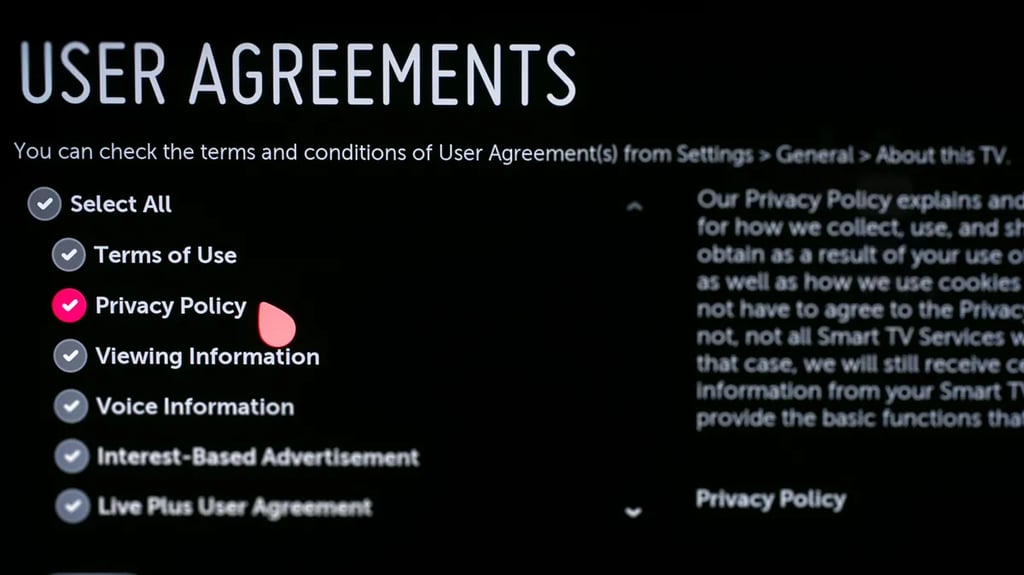
Pro Tip: Navigate to Support > Privacy & Terms > User Agreements and opt-out of "Viewing Information" and "Voice Information" to keep your conversations private.
2. Samsung Smart TVs (Tizen)
Samsung’s privacy settings are buried deep within their "Terms & Conditions" menus.
The Path: Go to Settings > Support > Terms & Privacy > Privacy Choices.
The Fix: Select Viewing Information Services and uncheck the "I Agree" box. This disables ACR.
Extra Step: In the same menu, disable Interest-Based Advertising to stop receiving targeted ads based on your habits.
3. Roku TVs (TCL, Hisense, Sharp)
Roku makes its money on ads, so they track everything by default.
The Path: Go to Settings > Privacy > Smart TV Experience.
The Fix: Uncheck Use Info from TV Inputs. This prevents Roku from tracking what you watch via cable boxes or gaming consoles.
Ad Tracking: Go to Settings > Privacy > Advertising and check the box for Limit Ad Tracking.
4. Amazon Fire TV
Amazon is a data-driven company, so their TVs are naturally "chatty" with their servers.
The Path: Go to Settings > Preferences > Privacy Settings.
The Fix: Turn off Device Usage Data and Collect App and Over-the-Air Usage.
Don't Forget: Disable Interest-Based Ads in this same section.
Why Privacy Matters for Your Home Theater
When we visit a home for a professional TV installation or a home audio setup, we often see clients surprised by how many "permissions" they accidentally agreed to during the initial unboxing.
Disabling these features doesn't just protect your privacy—it can actually improve your TV’s performance. ACR and data-reporting background processes consume CPU power and bandwidth. By "silencing" these trackers, your TV can focus its resources on what matters: processing 4K HDR content and maintaining a snappy interface.
Beyond the Mount: Complete Home Solutions
At MountMyTV, our expertise goes far beyond the bracket. Whether you need a sophisticated surround sound calibration, smart home integration, or custom shelving and wire concealment, we help you build a tech ecosystem that works for you—not for data brokers.
Ready to upgrade your viewing experience? Contact MountMyTV today for a professional consultation. We’ll handle the mounting, the wiring, and the setup, so all you have to do is grab the popcorn.
Smart TV Privacy: Frequently Asked Questions
Q: If I disable ACR, will my voice commands stop working? A: No. Disabling ACR (Automatic Content Recognition) only stops the TV from "watching" the pixels on your screen to track your viewing habits. It does not disable the microphone. You can still tell your TV to "Open Netflix" or "Turn up the volume" even with ACR turned off.
Q: Is my TV always listening to me? A: By default, many modern TVs have a "Wake Word" feature (like "Hey LG" or "Alexa") that keeps the microphone active to listen for your command. If this feels too invasive, you can disable the "Hands-Free Voice Control" or "Voice Wake-Up" in your settings. You’ll still be able to use voice commands—you’ll just need to press the microphone button on your remote first.
Q: Will turning off tracking make my TV "dumber"? A: It won't affect the apps or picture quality, but you might notice that the "Recommended for You" section on your home screen becomes less accurate. Most of our clients at MountMyTV actually prefer this, as it removes "sponsored" clutter and keeps the interface snappier.
Q: Can I just unplug my TV from the internet? A: You can, but you'll lose all Smart features. If you want a "Dumb TV" experience with high-end privacy, we recommend connecting a dedicated streaming device (like an Apple TV) to your mounted screen. We can help you configure these external devices to ensure they aren't over-collecting data either.
Why MountMyTV Does More for Your Home
Privacy is just one piece of the puzzle. At MountMyTV, we believe a home theater should be a sanctuary. That’s why we offer a full suite of services to ensure your space is optimized for both performance and peace of mind:
Custom Smart Home Integration: We don't just hang TVs; we connect your ecosystem securely.
Audio Calibration: Ensure your surround sound is tuned perfectly for your room’s acoustics.
Wire Concealment & Shelving: A clean, distraction-free environment for the ultimate movie night.
Want a setup that’s as private as it is professional? Book your full-service consultation with MountMyTV today!